Curlish as the Lingua Franca for Developers

Table of Contents
Thank you so much for making this article accessible to English-speaking readers!
Over the past few months, I’ve often found myself working on projects that require integrating with third-party APIs — almost always over HTTP(s). The problem is that every project has its own more or less complicated network topology. Ports are all over the place, some services use SSL, others don’t, and a few seem to operate through obscure mystical rituals.
Given all that — and the fact that you constantly have to coordinate with different people — it’s simply not enough to say, “my software1 can’t make this request for X reasons”, even if you provide perfectly clear logs, because:
- there’s no guarantee the people you’re talking to can (or want to) interpret your logs;
- it’s easier to assume you’re the problem;
- you’re probably not talking to the right person anyway.
Now, since the software I write is absolutely flawless2, and I have no intention of proving that to anyone, I need something external — something well-known that nobody can reasonably question.
It also needs to be self-describing: the inputs that reproduce the test scenario should be explicit, and the outputs should clearly reveal any anomalies.
No, the answer isn’t telling the right people to go to hell… unfortunately.
The Magic of curl #
Fortunately, we have curl: a program that’s installed on virtually every Linux distribution (and on Macs too, right Apple?3).
It lets you make HTTP requests in just about every conceivable way while exposing a wealth of diagnostic information.
I’m not going to explain every possible command-line option — that’s what the manual is for. You should know it by heart (think of it as one of those poems you had to memorize in school, except it’s written in sysadmin).
Let’s look at an example to see why curl is so awesome:
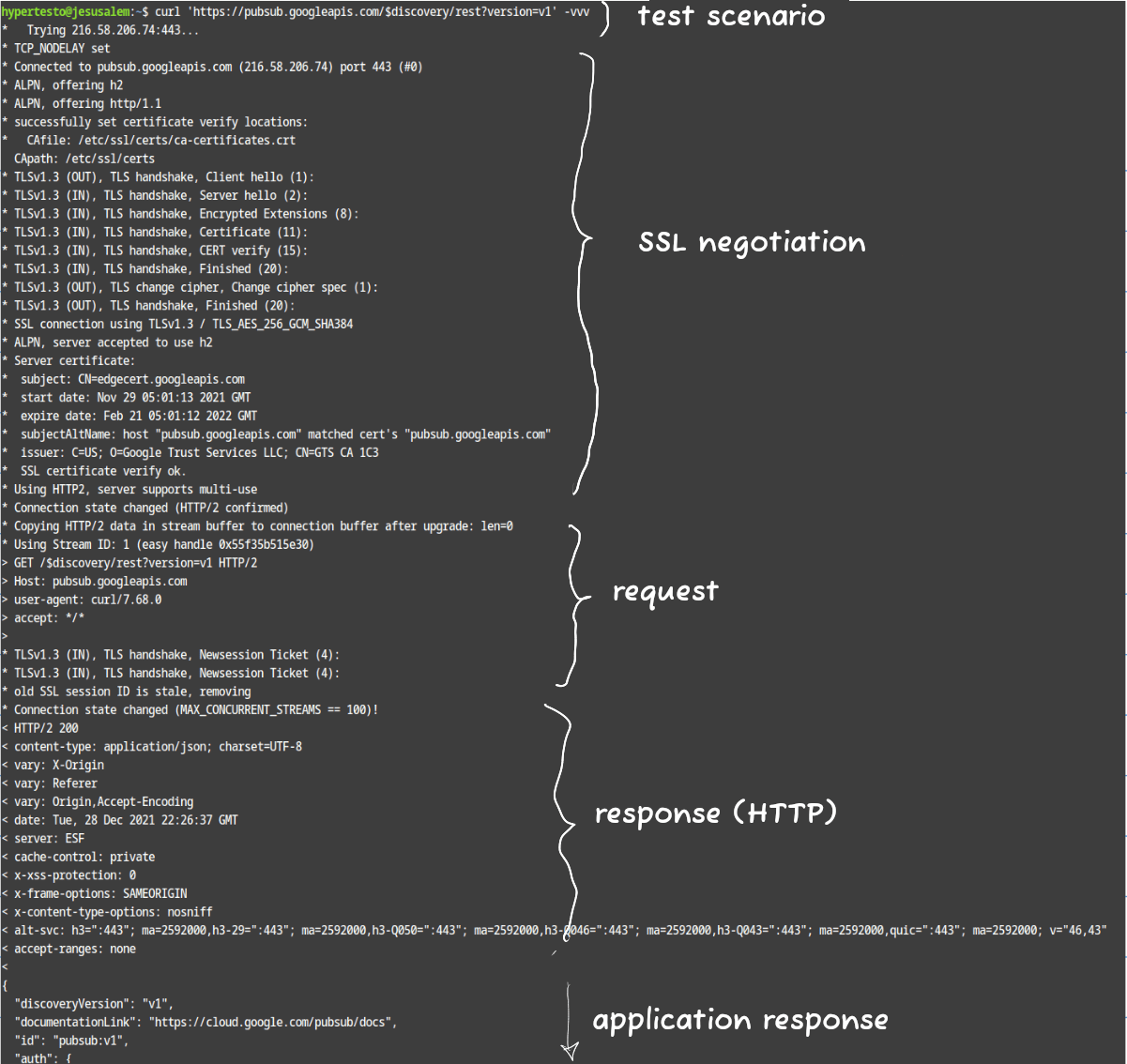
As you can see, it’s all there: inputs, outputs, parameter negotiation, the messages exchanged “under the hood”, and the ability to dump everything into a nice (and, more importantly, easily shareable) text file using simple output redirection.
The example above is rather boring because everything works perfectly. But, as I mentioned earlier, using curl as a “lingua franca” becomes incredibly valuable precisely when things don’t work.
In those situations, the expected output varies depending on what’s actually broken. Here are the problems I encounter most often4:
- Client/server connectivity issues:
connection timed out,connection refused - Self-signed or untrusted SSL certificates:
SSL certificate problem: unable to get local issuer certificate - SSL handshake failures5:
SSL routines:ssl3_read_bytes:sslv3 alert handshake failure,curl: (35) Encountered end of file,Unable to establish SSL connection. - APIs that are supposed to use HTTPS but are still serving plain HTTP:
SSL routines:ssl3_get_record:wrong version number
If you’ve made it this far, chances are you’re interested in speaking Curlish too. Here’s a lightning-fast overview of the command-line options that are most useful for debugging:
-v,--verbose: displays HTTP messages (including headers) and the SSL handshake. Lines beginning with>are sent by the client; lines beginning with<are received from the server.-k,--insecure: skips SSL certificate validation.--connect-timeout <seconds>: sets a connection timeout. This is handy when there’s no connectivity and you’d otherwise have to wait a geological era before getting rejected. (Sure, you could pressCtrl+C, but as dedicated students of Curlish, we want every last detail captured in the output).--local-port <num/range>: extremely useful for simulating traffic between specific source ports that are allowed through a firewall.-x,--proxy [protocol://]host[:port]: sends the request through a proxy.--trace-ascii <file>,--trace <file>: records a dump of all exchanged data. The ASCII version is considerably more human-friendly.--trace-time: prefixes every trace line with a timestamp. This is invaluable when you’re debugging paranormal phenomena where messages arrive with unexpected delays or similar oddities. In situations like these, common sense also suggests capturingtcpdumptraces on every node involved in the communication (client, server, firewalls, and so on), but unfortunately that isn’t always possible.
Now that you’ve been properly educated in the fine art of Curlish, all that’s left is to spread the gospel! Here are a few ideas for formally requesting that someone runs the command:
- Run a few curls for me.
- Curl those APIs.
- Curl that damn service.
- Curl everything.
And of course, don’t forget the opposite case:
- I ran a few curls here and there.
- I curl things. I see people.
- The curlification tests have been completed.
One last note before you go: in the screenshot, I somewhat loosely referred to what you see as the “SSL negotiation”. Strictly speaking, the output only shows the certificate (or at least the parts relevant for validation) and the negotiated cipher suite. In practice, though, that’s usually more than enough — as long as you’re talking to the right people.
If you have any suggestions or know of other curl options that are particularly useful for debugging, the comments section is all yours!
Baracca™.
The term “Baracca™” is an inside joke we had with my coworkers, and it humorously refers to things that are “slapdash,” “cobbled together,” or hastily put together (in fact a “baracca” is literally “shack”). ↩︎Just like me. ↩︎
The exact error messages vary considerably depending on the version of
curl, so don’t take these literally—they’re only examples. ↩︎This opens an entire can of worms: misconfigured servers, obsolete cipher suites unsupported by modern clients, and countless other wonderful surprises. ↩︎